共计 6095 个字符,预计需要花费 16 分钟才能阅读完成。
list.phtml
加入js:
[php]
<script>
jQuery(document).ready(function($) {
jQuery(‘img.lazy’).asynchImageLoader({
event: ‘load+scroll’,
placeholder : "/skin/frontend/default/default/images/loader.gif",
});
});
(function($){
var $window = $(window);
$.fn.asynchImageLoader = $.fn.jail = function(options) {
// Configuration
options = $.extend({
timeout : 10,
effect : false,
speed : 400,
selector: null,
offset : 0,
event : ‘load+scroll’,
callback : jQuery.noop,
callbackAfterEachImage : jQuery.noop,
placeholder : false
}, options);
var images = this;
$.jail.initialStack = this;
// Store the selector into ‘triggerEl’ data for the images selected
this.data(‘triggerEl’, (options.selector) ? $(options.selector) : $window);
// Use a placeholder in case it is specified
if (options.placeholder !== false) {
images.each(function(){
$(this).attr("src", options.placeholder);
});
}
// When the event is not specified the images will be loaded with a delay
if(/^load/.test(options.event)) {
$.asynchImageLoader.later.call(this, options);
} else {
$.asynchImageLoader.onEvent.call(this, options, images);
}
return this;
};
// Methods cointaing the logic
$.asynchImageLoader = $.jail = {
// Remove any elements that have been loaded from the jQuery stack.
// This should speed up subsequent calls by not having to iterate over the loaded elements.
_purgeStack : function(stack) {
// number of images not loaded
var i = 0;
while(true) {
if(i === stack.length) {
break;
} else {
if(stack[i].getAttribute(‘long-desc’)) {
i++;
} else {
stack.splice(i, 1);
}
}
}
},
// Load the image – after the event is triggered on the image itself – no need
// to check for visibility
_loadOnEvent : function(e) {
var $img = $(this),
options = e.data.options,
images = e.data.images;
// Load images
$.asynchImageLoader._loadImage(options, $img);
// Image has been loaded so there is no need to listen anymore
$img.unbind( options.event, $.asynchImageLoader._loadOnEvent );
$.asynchImageLoader._purgeStack( images );
if (!!options.callback) {
$.asynchImageLoader._purgeStack( $.jail.initialStack );
$.asynchImageLoader._launchCallback($.jail.initialStack, options);
}
},
// Load the image – after the event is triggered by a DOM element different
// from the images (options.selector value) or the event is "scroll" –
// visibility of the images is checked
_bufferedEventListener : function(e) {
var images = e.data.images,
options = e.data.options,
triggerEl = images.data(‘triggerEl’);
clearTimeout(images.data(‘poller’));
images.data(‘poller’, setTimeout(function() {
images.each(function _imageLoader(){
$.asynchImageLoader._loadImageIfVisible(options, this, triggerEl);
});
$.asynchImageLoader._purgeStack( images );
if (!!options.callback) {
$.asynchImageLoader._purgeStack( $.jail.initialStack );
$.asynchImageLoader._launchCallback($.jail.initialStack, options);
}
}, options.timeout));
},
// Images loaded triggered by en event (event different from "load" or "load+scroll")
onEvent : function(options, images) {
images = images || this;
if (options.event === ‘scroll’ || options.selector) {
var triggerEl = images.data(‘triggerEl’);
if(images.length > 0) {
// Bind the event to the selector specified in the config obj
triggerEl.bind( options.event, { images:images, options:options }, $.asynchImageLoader._bufferedEventListener );
if (options.event === ‘scroll’ || !options.selector) {
$window.resize({ images:images, options:options }, $.asynchImageLoader._bufferedEventListener );
}
return;
} else {
if (!!triggerEl) {
triggerEl.unbind( options.event, $.asynchImageLoader._bufferedEventListener );
}
}
} else {
// Bind the event to the images
images.bind(options.event, { options:options, images:images }, $.asynchImageLoader._loadOnEvent);
}
},
// Method called when event : "load" or "load+scroll" (default)
later : function(options) {
var images = this;
// If the ‘load’ event is specified, immediately load all the visible images and remove them from the stack
if (options.event === ‘load’) {
images.each(function(){
$.asynchImageLoader._loadImageIfVisible(options, this, images.data(‘triggerEl’));
});
}
$.asynchImageLoader._purgeStack(images);
$.asynchImageLoader._launchCallback(images, options);
// After [timeout] has elapsed, load the remaining images if they are visible OR (if no event is specified)
setTimeout(function() {
if (options.event === ‘load’) {
images.each(function(){
$.asynchImageLoader._loadImage(options, $(this));
});
} else {
// Method : "load+scroll"
images.each(function(){
$.asynchImageLoader._loadImageIfVisible(options, this, images.data(‘triggerEl’));
});
}
$.asynchImageLoader._purgeStack( images );
$.asynchImageLoader._launchCallback(images, options);
if (options.event === ‘load+scroll’) {
options.event = ‘scroll’;
$.asynchImageLoader.onEvent( options, images );
}
}, options.timeout);
},
_launchCallback : function(images, options) {
if (images.length === 0 && !$.jail.isCallback) {
//Callback call
options.callback.call(this, options);
$.jail.isCallback = true;
}
},
// Function that checks if the images have been loaded
_loadImageIfVisible : function(options, image, triggerEl) {
var $img = $(image),
container = (options.event === ‘scroll’ ? triggerEl : $window);
if ($.asynchImageLoader._isInTheScreen (container, $img, options.offset)) {
$.asynchImageLoader._loadImage(options, $img);
}
},
// Function that returns true if the image is visible inside the "window" (or specified container element)
_isInTheScreen : function($ct, $img, optionOffset) {
var is_ct_window = $ct[0] === window,
ct_offset = (is_ct_window ? { top:0, left:0 } : $ct.offset()),
ct_top = ct_offset.top + ( is_ct_window ? $ct.scrollTop() : 0),
ct_left = ct_offset.left + ( is_ct_window ? $ct.scrollLeft() : 0),
ct_right = ct_left + $ct.width(),
ct_bottom = ct_top + $ct.height(),
img_offset = $img.offset(),
img_width = $img.width(),
img_height = $img.height();
return (ct_top – optionOffset) <= (img_offset.top + img_height) &&
(ct_bottom + optionOffset) >= img_offset.top &&
(ct_left – optionOffset)<= (img_offset.left + img_width) &&
(ct_right + optionOffset) >= img_offset.left;
},
// Main function –> Load the images copying the "long-desc" attribute into the "src" attribute
_loadImage : function(options, $img) {
$img.hide();
$img.attr("src", $img.attr("long-desc"));
$img.removeAttr(‘long-desc’);
// Images loaded with some effect if existing
if(options.effect) {
if (options.speed) {
$img[options.effect](options.speed);
} else {
$img[options.effect]();
}
} else {
$img.show();
}
// Callback after each image is loaded
options.callbackAfterEachImage.call(this, options);
}
};
}(jQuery));
</script>[/php]
[php]<img class="lazy" long-desc="<?php echo $this->helper(‘catalog/image’)->init($_product, ‘small_image’); ?>" src="<?php echo $this->getSkinUrl(‘images/loader.gif’); ?>" width="250px;" alt="<?php echo $this->stripTags($this->getImageLabel($_product, ‘small_image’), null, true) ?>" />
[/php]








 多乐士
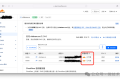
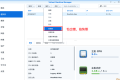
通过摸索发现ssh拉取会报错,直接网页访问下载会报404错误,不知道原因;但是可以通过群晖CM注册表访问下载,其方法如下:
Container Manager-注册表-设置-新增-注册表名称随便写,注册表URL填你的加速地址,勾选信任的SSL自我签署证书,登录信息不填-应用-使用你的地址,这是注册表会显示了,在搜索栏中输入映像名称,搜索结果在每一页的最后一个,你需要划到最后一个进行下载,实测可正常下载安装。
以上供网友参考。
多乐士
通过摸索发现ssh拉取会报错,直接网页访问下载会报404错误,不知道原因;但是可以通过群晖CM注册表访问下载,其方法如下:
Container Manager-注册表-设置-新增-注册表名称随便写,注册表URL填你的加速地址,勾选信任的SSL自我签署证书,登录信息不填-应用-使用你的地址,这是注册表会显示了,在搜索栏中输入映像名称,搜索结果在每一页的最后一个,你需要划到最后一个进行下载,实测可正常下载安装。
以上供网友参考。
 辞了老衲
这个确实有帮助。
辞了老衲
这个确实有帮助。
 渋驀
当然任何时候都可以用curl命令和crontab来实现动态更新DDNS的ip地址:
1、安装crontab之后为root用户创建文件/var/spool/cron/root
2、创建并配置ddnsupdate.sh,放到/usr/bin/文件下,文件内容(以he.net为例):
Autodetect my IPv4/IPv6 address:
IPV4:curl -4 "http://dyn.example.com:password@dyn.dns.he.net/nic/update?hostname=dyn.example.com"
IPV6:curl -6 "http://dyn.example.com:password@dyn.dns.he.net/nic/update?hostname=dyn.example.com"
3、添加执行权限chomod +x /usr/bin/ddnsupdate.sh
4、编辑root用户的crontab:*/10 * * * * /usr/binddnsupdate.sh,每10分钟执行一次。好了,可以享受你的DDNS了
渋驀
当然任何时候都可以用curl命令和crontab来实现动态更新DDNS的ip地址:
1、安装crontab之后为root用户创建文件/var/spool/cron/root
2、创建并配置ddnsupdate.sh,放到/usr/bin/文件下,文件内容(以he.net为例):
Autodetect my IPv4/IPv6 address:
IPV4:curl -4 "http://dyn.example.com:password@dyn.dns.he.net/nic/update?hostname=dyn.example.com"
IPV6:curl -6 "http://dyn.example.com:password@dyn.dns.he.net/nic/update?hostname=dyn.example.com"
3、添加执行权限chomod +x /usr/bin/ddnsupdate.sh
4、编辑root用户的crontab:*/10 * * * * /usr/binddnsupdate.sh,每10分钟执行一次。好了,可以享受你的DDNS了
 21410
请问下载链接在那里?
21410
请问下载链接在那里?
 madkylin
不错,不错,谢谢分享了,好东西啊
madkylin
不错,不错,谢谢分享了,好东西啊 
 feilung
求方法
feilung
求方法
 zengsuyi
应该挺不错的
zengsuyi
应该挺不错的
 zise
看看是怎么操作的。。
zise
看看是怎么操作的。。